Baking Characters: WIP4
This page hosts another experiment with website environments for Apple Vision Pro. (WARNING: this website environment in more work in progress than normal… I have not added clothes to the characters yet. I am still dealing with seams between meshes for the characters that look like scar tissue)
To enable website environments in Apple Vision Pro, navigate to
Settings > Apps > Safari > Advanced > Feature Flags
then enable “Website environments”.
(After enabling website environments, you may need to reload this page)
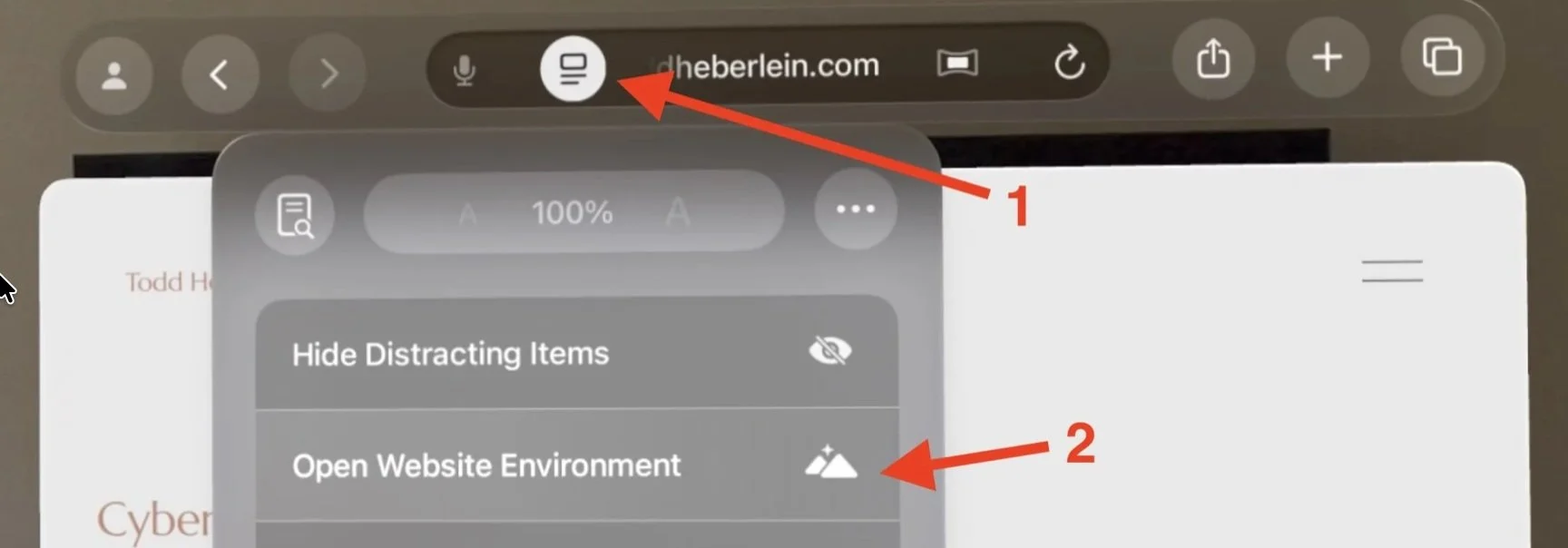
When you are on a web page with a website environment, tap on the left button in the Safari Address bar (1), and then select “Open Website Environment” (2).
The Apple WWDC video for this feature can be found here:
What’s new for the spatial web
To browse the Internet while remaining in the website environment, open a second Safari window and browse the Internet in the second window. I typically put the Safari window with the web environment off to the side.
Repeat warning: The purpose of the exercise is to test baking multiple characters into a scene. I have not added clothes to the characters yet.
I am still having problems hiding the seams of the characters. For example, where the arms and legs meet the torso, there is a seam. This contributes to the characters looking like mannequins. Similar effects occur with clothes too.